





v3.0 — Complete rewrite
This release is a ground-up rewrite of the integration to prepare for inclusion in Home Assistant Core. It uses the new
ha-garminlibrary, replaces the old authentication method, and restructures all sensors to follow HA conventions.What this means for you:
- Re-authentication required — The old OAuth tokens are not compatible with the new library. After updating you will be prompted to re-authenticate each configured Garmin account.
- Entity IDs are preserved — The migration automatically updates internal identifiers so your existing dashboards and automations keep working. Some sensors have been renamed or replaced; any that no longer exist will simply disappear.
- Many new sensors — 130+ sensors (up from ~100), including HRV details, training metrics, blood pressure, menstrual cycle tracking, and more.
The Garmin Connect integration connects your Garmin Connect cloud service to Home Assistant, enabling users to monitor their health and fitness data from Garmin wearable devices directly in Home Assistant.
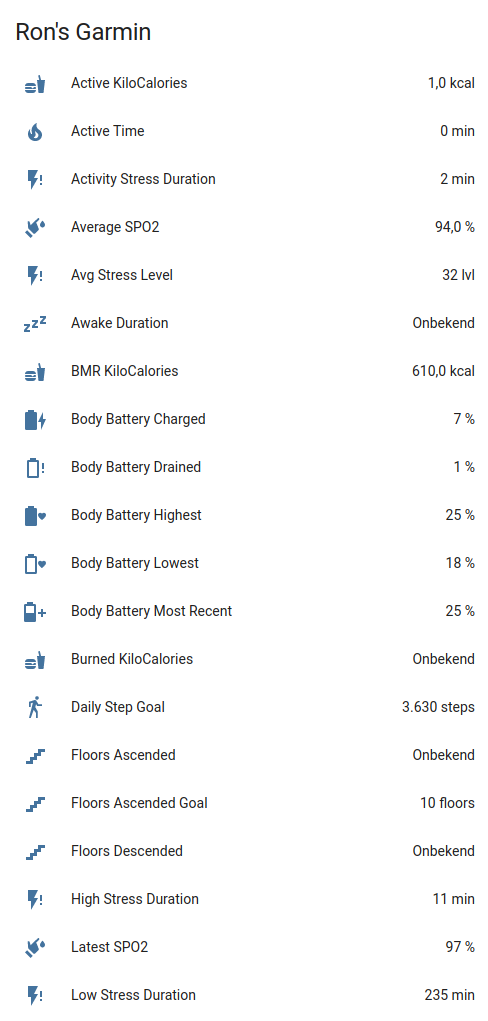
The integration provides 130+ sensors across the following categories:
- Daily health metrics — Steps, distance, floors climbed, calories burned
- Heart rate monitoring — Resting, min, max, and 7-day average heart rate
- HRV (Heart Rate Variability) — Status, weekly/nightly averages, baseline metrics
- Stress tracking — Average/max stress levels, stress duration breakdowns
- Sleep analysis — Total sleep, deep/light/REM sleep, sleep score, sleep need, bedtime/wake targets
- Body Battery — Current level, charged/drained values
- Body composition — Weight, BMI, body fat, muscle mass, bone mass, hydration
- Training metrics — Training readiness, training status, lactate threshold, endurance/hill scores, power-to-weight and FTP by sport
- Activities & workouts — Last activity, recent activities list, workout tracking
- Goals & badges — Active/future goals, goal history, earned badges
- Blood pressure — Systolic, diastolic, pulse measurements
- Menstrual cycle tracking — Cycle phase, day, fertile window (disabled by default)
- Gear tracking — Dynamic sensors for shoes, bikes, and other equipment
- Hydration — Daily intake, goals, sweat loss
- A Garmin Connect account
- At least one Garmin device synced to your account
- If you have MFA (Multi-Factor Authentication) enabled, you'll need access to your authentication method during setup

Alternatively:
- Install HACS if not already installed
- Search for "Garmin Connect" in HACS
- Click Download
- Restart Home Assistant
- Add via Settings → Devices & Services
- Copy
custom_components/garmin_connectto your<config>/custom_components/directory - Restart Home Assistant
- Add via Settings → Devices & Services
- Navigate to Settings → Devices & Services
- Click + Add Integration
- Search for "Garmin Connect"
- Enter your Garmin Connect email and password
- If MFA is enabled, enter the verification code when prompted
After setup, configure these options via the integration's Configure button:
| Option | Default | Description |
|---|---|---|
| Scan interval | 300 | How often to fetch data in seconds (60–3600) |
The integration uses cloud polling to fetch data from Garmin Connect servers. Data is refreshed based on the configured scan interval (default: 5 minutes). Eight independent coordinators fetch data in parallel:
| Coordinator | Data |
|---|---|
| Core | Steps, distance, calories, heart rate, stress, sleep, body battery, SpO2, respiration, intensity |
| Activity | Last activity, recent activities, workouts |
| Training | Training readiness/status, HRV, lactate threshold, endurance/hill scores, power-to-weight and FTP by sport |
| Body | Weight, BMI, body fat, muscle mass, hydration, fitness age |
| Goals | Active/future goals, goal history, badges, user points |
| Gear | Shoes, bikes, equipment usage and distance |
| Blood Pressure | Systolic, diastolic, pulse |
| Menstrual | Cycle phase, day, fertile window |
Tip: Garmin devices sync to Garmin Connect when in Bluetooth range of the paired phone or via WiFi. Sensors update after your device syncs to Garmin Connect and the integration polls for new data.
All sensors are created under a single "Garmin Connect" device. Entity IDs follow the pattern sensor.garmin_connect_[sensor_name].
Note: Most sensors are enabled by default. Menstrual cycle sensors are disabled by default and can be enabled in the entity settings. Sensor values depend on your Garmin devices and connected apps — not all data may be available for your account.
| Sensor | Description |
|---|---|
| Steps | Daily step count |
| Daily Step Goal | Your configured step target |
| Distance | Distance walked/run in meters |
| Yesterday Steps / Distance | Previous day's complete totals |
| Weekly Step / Distance Avg | 7-day averages |
| Floors Ascended / Descended | Floors climbed and descended |
| Floors Ascended Distance | Vertical distance climbed in meters |
| Sensor | Description |
|---|---|
| Calories | Total daily calories |
| Active Calories | Calories from activity |
| BMR Calories | Basal metabolic rate calories |
| Burned / Consumed / Remaining Calories | Calorie tracking |
| Sensor | Description |
|---|---|
| Resting Heart Rate | Daily resting HR |
| Min / Max Heart Rate | Daily HR range |
| 7-Day Average Resting Heart Rate | Weekly resting HR average |
| Min / Max Average Heart Rate | Average min/max HR |
| Abnormal Heart Rate Alerts | Count of abnormal HR alerts |
| Sensor | Description |
|---|---|
| HRV Status | Current HRV status (balanced, low, etc.) |
| HRV Weekly Average | 7-day HRV average |
| HRV Last Night Average | Overnight HRV average |
| HRV Last Night 5-Min High | Peak 5-minute HRV during sleep |
| HRV Baseline | Personal HRV baseline range |
| Sensor | Description |
|---|---|
| Average / Max Stress Level | Stress measurements |
| Stress Qualifier | Overall stress descriptor |
| Total Stress Duration | Total time in stress |
| Rest / Activity / Low / Medium / High Stress Duration | Duration breakdowns |
| Stress Percentage | Percentage breakdowns by category |
| Sensor | Description |
|---|---|
| Sleep Score | Overall sleep quality score |
| Sleep Need | Target sleep need in minutes |
| Sleep Duration | Total time asleep |
| Total Sleep Duration | Total sleep window duration |
| Awake Duration | Time awake during sleep |
| Deep / Light / REM Sleep | Time in each sleep stage |
| Bedtime / Wake Time | Actual bedtime and wake timestamps |
| Optimal Bedtime / Optimal Wake Time | Recommended sleep timing timestamps |
| Nap Time | Daytime nap duration |
| Unmeasurable Sleep | Unclassified sleep time |
| Sensor | Description |
|---|---|
| Body Battery | Current energy level (0–100) |
| Charged / Drained | Energy gained and spent |
| Highest / Lowest | Daily peak and low |
| Sensor | Description |
|---|---|
| Weight | Body weight in kg |
| BMI | Body Mass Index |
| Body Fat / Body Water | Percentage measurements |
| Muscle Mass / Bone Mass | Mass measurements in kg |
| Visceral Fat | Visceral fat percentage |
| Physique Rating | Body physique rating |
| Metabolic Age | Estimated metabolic age |
| Sensor | Description |
|---|---|
| Hydration | Daily water intake (ml) |
| Hydration Goal | Target intake |
| Hydration Daily Average | Average daily intake |
| Hydration Sweat Loss | Estimated fluid loss |
| Hydration Activity Intake | Intake during activities |
| Sensor | Description |
|---|---|
| Systolic | Systolic blood pressure (mmHg) |
| Diastolic | Diastolic blood pressure (mmHg) |
| Pulse | Pulse from blood pressure reading (bpm) |
| Sensor | Description |
|---|---|
| Average / Lowest / Latest SpO2 | Blood oxygen levels |
| Latest SpO2 Time | When SpO2 was last measured |
| Highest / Lowest / Latest Respiration | Breathing rate (brpm) |
| Latest Respiration Time | When respiration was last measured |
| Average Altitude | Average monitoring altitude |
| Sensor | Description |
|---|---|
| Fitness Age / Achievable / Previous Fitness Age | Estimated fitness ages |
| Chronological Age | Your actual age |
| Endurance Score | Overall endurance rating |
| Hill Score | Hill running/climbing score |
| Training Readiness | Training readiness score (%) |
| Morning Training Readiness | Wake-up readiness score (%) |
| Training Status | Current training status phrase |
| VO2 Max | Most recent VO2 Max value (mL/(kg·min)) |
| Lactate Threshold HR | Lactate threshold heart rate (bpm) |
| Lactate Threshold Speed | Lactate threshold pace (m/s) |
| Power to Weight [Sport] | Dynamic per-sport power-to-weight sensor (W/kg), e.g. Running, Cycling |
| FTP [Sport] | Dynamic per-sport functional threshold power sensor (W), e.g. Running, Cycling |
| Next Alarm | Next scheduled alarm time |
Power-to-weight and FTP sensors are created dynamically for each available sport in your Garmin training data. Names are formatted like
Power to Weight RunningandFTP Running.
| Sensor | Description |
|---|---|
| Active Goals | Number of in-progress goals with progress |
| Future Goals | Upcoming scheduled goals |
| Goals History | Last 10 completed goals with status |
| Badges | Total badges earned |
| User Points / User Level | Gamification metrics |
Goal sensors include detailed attributes:
goalType,targetValue,currentValue,progressPercent,startDate,endDate, andactivityType.
| Sensor | Description |
|---|---|
| Last Activity | Most recent activity with details |
| Last Activities | Recent activities list (attributes) |
| Last Workout / Workouts | Scheduled/planned training sessions |
| Last Synced | Last device sync timestamp |
Requires a Garmin blood pressure device (e.g., Index BPM). Sensors are populated from the most recent measurement.
| Sensor | Description |
|---|---|
| Blood Pressure Systolic | Systolic blood pressure (mmHg) |
| Blood Pressure Diastolic | Diastolic blood pressure (mmHg) |
| Blood Pressure Pulse | Pulse from blood pressure reading (bpm) |
| Blood Pressure Category | Category name (e.g., Normal, Elevated) |
| Blood Pressure Measurement Time | Local timestamp of the measurement |
| Sensor | Description |
|---|---|
| Cycle Phase | Current menstrual phase |
| Cycle Day | Day of the current cycle |
| Cycle Type | Type of cycle tracking |
| Cycle Start | Start date of current cycle |
| Period Length | Period length (days) |
| Days Until Next Phase | Days remaining in current phase |
| Fertile Window Start / End | Predicted fertile window |
| Next Predicted Cycle Start | Predicted start of next cycle |
Menstrual cycle sensors are disabled by default and only available if tracking is enabled in your Garmin Connect account.
Gear sensors are dynamically created for each piece of equipment registered in Garmin Connect (shoes, bikes, etc.). They track total distance in meters and include attributes like gear_uuid, total_activities, gear_make_name, gear_model_name, and default_for_activity.
The Last Activity sensor includes a polyline attribute with GPS coordinates when the activity has GPS data (hasPolyline: true). This can be displayed on a map using the included custom Lovelace card.
Installation:
- Copy
www/garmin-polyline-card.jsto your<config>/www/folder - Add as a resource: Settings → Dashboards → ⋮ → Resources → Add Resource
- URL:
/local/garmin-polyline-card.js - Type: JavaScript Module
- URL:
- Hard refresh your browser (Ctrl+Shift+R)
Usage:
type: custom:garmin-polyline-card
entity: sensor.garmin_connect_last_activity
attribute: polyline
title: Last Activity Route
height: 400px
color: "#FF5722"| Option | Default | Description |
|---|---|---|
entity |
(required) | Sensor entity with polyline attribute |
attribute |
polyline |
Attribute containing GPS coordinates |
title |
Activity Route |
Card title |
height |
300px |
Map height |
color |
#FF5722 |
Route line color |
weight |
4 |
Route line thickness |

Set gear as the default for an activity type.
| Parameter | Required | Description |
|---|---|---|
gear_uuid |
No* | UUID of the gear (from sensor attributes) |
entity_id |
No* | Alternatively, select a gear sensor entity |
activity_type |
Yes | running, cycling, hiking, walking, swimming, other |
setting |
No | set this as default, unset others / set as default / unset default |
*Either gear_uuid or entity_id is required.
action: garmin_connect.set_active_gear
data:
  entity_id: sensor.garmin_connect_my_running_shoes
  activity_type: running
setting: "set this as default, unset others"Record body composition metrics to Garmin Connect.
| Parameter | Required | Description |
|---|---|---|
entity_id |
No | Garmin Connect entity whose account should receive the measurement |
weight |
Yes | Weight in kg |
timestamp |
No | ISO datetime (defaults to now) |
bmi |
No | Body Mass Index |
percent_fat |
No | Body fat percentage |
percent_hydration |
No | Hydration percentage |
visceral_fat_mass |
No | Visceral fat in kg |
bone_mass |
No | Bone mass in kg |
muscle_mass |
No | Muscle mass in kg |
basal_met |
No | Basal metabolic rate (kcal) |
active_met |
No | Active metabolic rate (kcal) |
physique_rating |
No | Physique rating (1–9) |
metabolic_age |
No | Metabolic age (years) |
visceral_fat_rating |
No | Visceral fat rating (1–59) |
action: garmin_connect.add_body_composition
data:
  entity_id: sensor.garmin_connect_weight
  weight: 82.3
  percent_fat: 23.6
muscle_mass: 35.5Record a blood pressure measurement.
| Parameter | Required | Description |
|---|---|---|
entity_id |
No | Garmin Connect entity whose account should receive the measurement |
systolic |
Yes | Systolic pressure (60–250 mmHg) |
diastolic |
Yes | Diastolic pressure (40–150 mmHg) |
pulse |
Yes | Pulse rate (30–220 bpm) |
timestamp |
No | ISO datetime (defaults to now) |
notes |
No | Additional notes |
action: garmin_connect.add_blood_pressure
data:
  entity_id: sensor.garmin_connect_blood_pressure_systolic
  systolic: 120
  diastolic: 80
  pulse: 60
notes: "Morning measurement"Log a hydration intake to Garmin Connect. Use a negative value to subtract from today's total.
| Parameter | Required | Description |
|---|---|---|
entity_id |
No | Garmin Connect entity whose account should receive the measurement |
value_in_ml |
Yes | Amount in millilitres (negative to subtract) |
timestamp |
No | ISO datetime (defaults to now) |
action: garmin_connect.add_hydration
data:
  entity_id: sensor.garmin_connect_hydration
value_in_ml: 250Create a manual activity in Garmin Connect.
| Parameter | Required | Description |
|---|---|---|
entity_id |
No | Garmin Connect entity whose account should receive the activity |
activity_name |
Yes | Name of the activity |
activity_type |
Yes | running, cycling, walking, hiking, swimming, fitness_equipment, other |
duration_min |
Yes | Duration in minutes (1–1440) |
start_datetime |
No | ISO datetime (defaults to now) |
distance_km |
No | Distance in kilometres |
time_zone |
No | Time zone (defaults to HA config) |
action: garmin_connect.create_activity
data:
  entity_id: sensor.garmin_connect_last_activity
  activity_name: "Morning Run"
  activity_type: running
  duration_min: 30
distance_km: 5.0Upload an activity file (FIT, GPX, TCX) to Garmin Connect.
| Parameter | Required | Description |
|---|---|---|
entity_id |
No | Garmin Connect entity whose account should receive the upload |
file_path |
Yes | Absolute path or relative to HA config directory |
action: garmin_connect.upload_activity
data:
  entity_id: sensor.garmin_connect_last_activity
file_path: "activities/morning_run.fit"Log a Quick Add nutrition entry to Garmin Connect. Requires a Connect+ subscription and initial nutrition setup in the Garmin Connect app.
| Parameter | Required | Description |
|---|---|---|
entity_id |
No | Garmin Connect entity whose account should receive the entry |
calories |
Yes | Calories (0–10000 kcal) |
carbs |
No | Carbohydrates in grams |
protein |
No | Protein in grams |
fat |
No | Fat in grams |
name |
No | Label for the entry (defaults to Quick Add) |
timestamp |
No | ISO datetime (defaults to now) |
action: garmin_connect.add_nutrition_log
data:
  entity_id: sensor.garmin_connect_calories
  calories: 650
  carbs: 80
  protein: 35
  fat: 20
name: "Lunch"Associate gear with a specific activity.
| Parameter | Required | Description |
|---|---|---|
activity_id |
Yes | Activity ID (from last_activity sensor attributes) |
gear_uuid |
No* | UUID of the gear |
entity_id |
No* | Alternatively, select a gear sensor entity |
*Either gear_uuid or entity_id is required.
action: garmin_connect.add_gear_to_activity
data:
  activity_id: 12345678901
entity_id: sensor.garmin_connect_my_running_shoesalias: "Sync Withings to Garmin"
triggers:
- trigger: state
entity_id: sensor.withings_weight
conditions:
- condition: numeric_state
entity_id: sensor.withings_weight
above: 40
below: 200
actions:
- action: garmin_connect.add_body_composition
data:
weight: "{{ states('sensor.withings_weight') }}"
timestamp: "{{ now().isoformat() }}"
bmi: "{{ (states('sensor.withings_weight') | float(0) / 1.72**2) | round(1) }}"
bone_mass: "{{ states('sensor.withings_bone_mass') }}"
muscle_mass: "{{ states('sensor.withings_muscle_mass') }}"
percent_fat: "{{ states('sensor.withings_fat_ratio') }}"alias: "Assign shoes to running activity"
triggers:
- trigger: state
entity_id: sensor.garmin_connect_last_activity
conditions:
- condition: template
value_template: "{{ state_attr('sensor.garmin_connect_last_activity', 'activityType') == 'running' }}"
actions:
- action: garmin_connect.add_gear_to_activity
data:
activity_id: "{{ state_attr('sensor.garmin_connect_last_activity', 'activityId') }}"
entity_id: sensor.garmin_connect_my_running_shoestemplate:
- sensor:
- name: "Today's Running Distance"
unit_of_measurement: "km"
state: >
{% set today = now().strftime('%Y-%m-%d') %}
{% set activities = state_attr('sensor.garmin_connect_last_activities', 'last_activities') | default([]) %}
{% set running = namespace(total=0) %}
{% for a in activities if a.activityType == 'running' and today in a.startTimeLocal %}
{% set running.total = running.total + a.distance %}
{% endfor %}
{{ (running.total / 1000) | round(2) }}If you're upgrading from an older version of this integration (which used the garminconnect / garth library), the integration will automatically:
- Migrate entity unique IDs so your existing entity IDs are preserved (automations and dashboards keep working)
- Request re-authentication since the authentication method has changed
- Entity naming entities now have default prefix 'Garmin Connect' we try to convert them, you can change it afterwards, this may break automations and dashboards
After upgrading, go to Settings → Devices & Services, find Garmin Connect, and complete the re-authentication flow. If you have multiple Garmin accounts configured, each will prompt separately.
- Cloud-based — Requires internet connection; data depends on Garmin servers availability
- Polling delay — Data updates only when your device syncs to Garmin Connect and the integration polls
- MFA sessions — MFA sessions may expire, requiring re-authentication
- Rate limiting — Excessive polling may trigger Garmin's rate limits; minimum interval is 60 seconds
- China region — Users with
.cnGarmin accounts need to set their country to China in Home Assistant configuration
- Go to Settings → Devices & Services
- Find Garmin Connect and click Reconfigure
- Enter your credentials and MFA code if prompted
- Check if your Garmin device has synced recently
- Verify the Garmin Connect website/app shows current data
- Not all data may be available depending on your Garmin device model
- Check Home Assistant logs for error messages
If you see 429 or rate limit errors wait 5-30 minutes before reloading the integration
logger:
  default: info
  logs:
    custom_components.garmin_connect: debug
Or enable via the UI: Settings → Devices & Services → Garmin Connect → Enable debug logging.

Then perform any steps to reproduce the issue and disable debug logging again. It will download the relevant log file automatically.
If you find this integration useful, please consider supporting its development:
- Star this repository
- Report issues
- Share with other Home Assistant users
This project is licensed under the MIT License — see the LICENSE file for details.