



Unleash AI agents with confidence.
You type: "Clean up my repo."
Your AI agent thinks: rm -rf *
Orca blocks it before it happens.
Orca wraps the AI tools you already use—Codex, Claude Code, OpenCode, OpenClaw, Hermes—and enforces local rules for commands, files, environment variables, and network calls. It is not an AI agent. It is the safety layer that lets you delegate to one.
# Install (macOS/Linux)
brew tap christopherkarani/orca && brew install --formula orca

# Or install with the official script
curl -fsSL https://raw.githubusercontent.com/christopherkarani/Orca/main/scripts/install.sh | sh

# Or build from source (Zig 0.15.2)
zig buildStart the web UI for a visual view of sessions, policy status, and prevented actions:
orca dashboardThen open http://127.0.0.1:7742. The dashboard is entirely local—no cloud services, no browser-side policy evaluation.
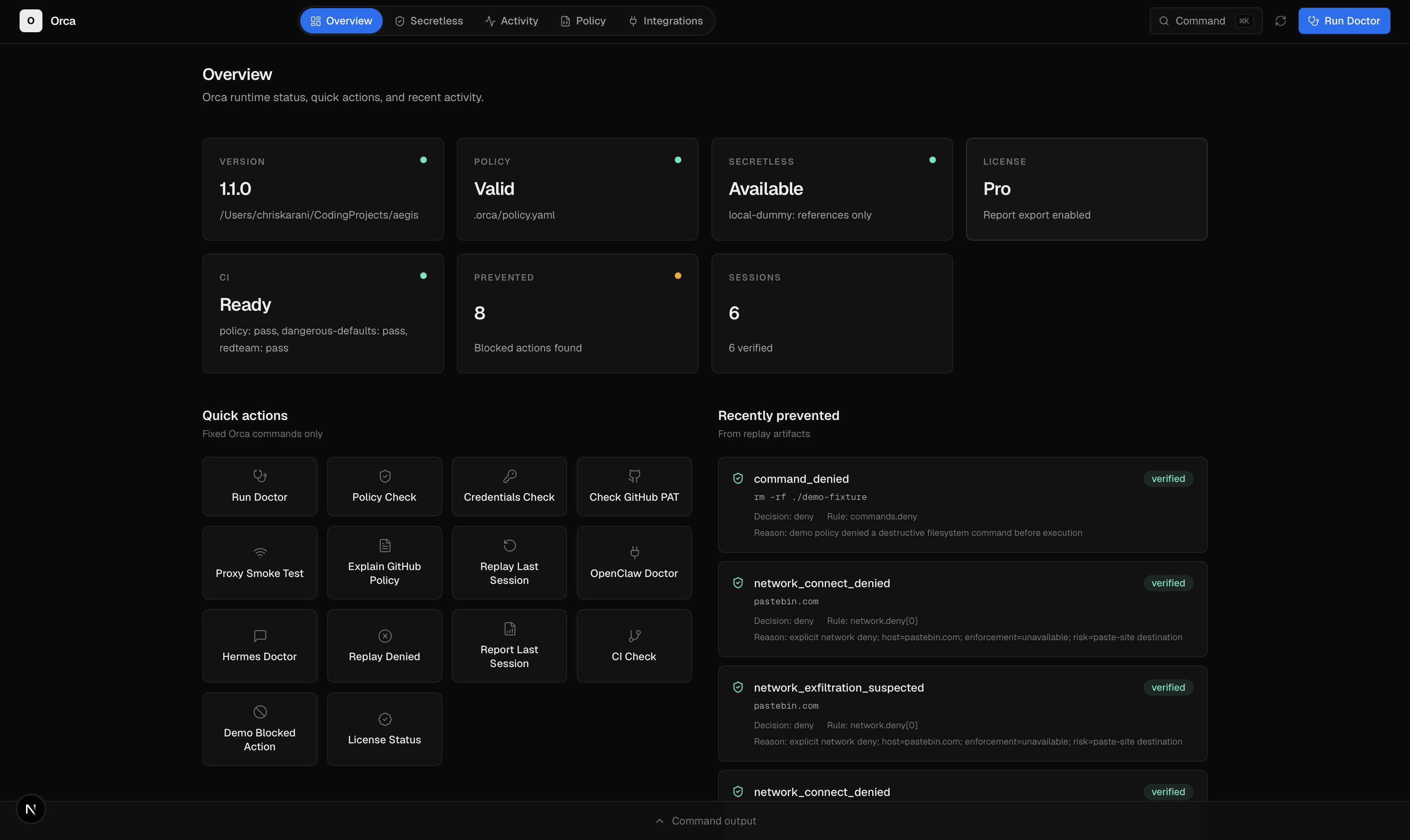
The dashboard shows live stats (version, policy validity, secretless mode, license), quick actions, and a feed of recently prevented actions with full verification status.
# 1. Check that Orca is ready
orca doctor

# 2. Initialize a policy
orca init --preset generic-agent

# 3. Watch Orca block a dangerous command—safely
orca demo blocked-action

# 4. Review exactly what was prevented
orca replay --session last --only denied --verify
No AI agent required for the demo. No files are harmed.
| Without Orca | With Orca |
|---|---|
You babysit every AI suggestion, afraid of rm -rf |
You delegate. Orca intercepts and blocks the bad ones |
| You have no idea what the agent actually did | You replay the full session—allowed, denied, and asked |
You copy .env into the agent context by accident |
Orca redacts secrets before they reach the agent |
| Your team has no shared rules | Commit .orca/policy.yaml—everyone runs under the same guardrails |
| You discover damage after the fact | You see the block in real time, before anything happens |
1. Solo developer using Claude Code or Codex
orca run -- claude
# Now code with confidence. Orca asks before risky actions.
2. Team lead standardizing AI tool usage
# Commit a policy to your repo
cat .orca/policy.yaml
# Everyone who clones the repo runs under the same rules automatically
3. CI pipeline running autonomous benchmarks
orca run --ci -- codex --prompt "Refactor the auth module"
# Non-interactive. No prompts. Dangerous actions are blocked, not asked.AI agents can run shell commands, read files, and make network requests on your behalf. That is powerful—and risky. Orca gives you three things:
-
Block dangerous actions before they happen
Stoprm -rf,sudo,curl | sh, or reading.envand SSH keys. -
Replay and audit sessions
After an agent finishes, see exactly what it tried to do, what was allowed, and what was denied. Evidence is tamper-evident and locally stored. -
Share team guardrails
Commit.orca/policy.yamlto your repo so everyone on your team runs under the same rules.
# macOS
brew tap christopherkarani/orca
brew install --formula orca

# Linux (amd64 / arm64)
curl -fsSL https://raw.githubusercontent.com/christopherkarani/Orca/main/scripts/install.sh | sh
The script installs to
~/.local/binand automatically adds it to your shell'sPATH. Open a new terminal (or runsource ~/.zshrc/.bashrc) to useorcaright away.Prefer to build? See docs/install.md for source builds, Windows installers, and Docker.
After installing, verify:
orca doctororca init --preset generic-agentThis creates .orca/policy.yaml in the current directory:
mode: ask

commands:
  default: ask
  allow:
    - "git status"
    - "git diff *"
    - "zig build *"
  deny:
    - "rm -rf *"
    - "sudo *"
    - "curl * | sh"

files:
  read:
    deny:
      - "./.env"
      - "~/.ssh/**"
      - "**/*token*"
mode: ask— Orca asks you before risky actions when you are interactive.mode: strict— Block more aggressively.mode: observe— Log decisions with minimal blocking.mode: ci— Never prompt;askbecomes block. Ideal for automation.
Validate it:
orca policy check .orca/policy.yamlorca run -- codex
orca run -- claude
orca run -- opencode
orca run -- openclaw
orca run -- hermesOrca launches the agent as a child process, intercepts its tool calls, and enforces your policy in real time.
After the agent exits:
# See everything that was denied
orca replay --session last --only denied --verify

# Export a report (requires local Pro/Team license)
orca license activate dev-pro
orca report --session last --format markdown

# JSON output for automation
orca replay --session last --only denied --json
Session artifacts live under .orca/sessions/<session-id>/.
┌─────────────┐      ┌──────────────┐      ┌─────────────────┐
│   You       │ ──▶  │    Orca      │ ──▶  │   AI Agent      │
│             │      │  (wrapper)   │      │ (Codex, etc.)   │
└─────────────┘      └──────────────┘      └─────────────────┘
                            │                        │
                            │                      tool call
                            │                        ▼
                     ┌──────────────┐      ┌─────────────────┐
                     │  Policy      │ ◀──  │  Tool / File /  │
                     │  engine      │      │  Network req    │
                     └──────────────┘      └─────────────────┘
                            │
                    allow / deny / ask
The strongest protection is the orca run wrapper, because Orca controls the agent process directly. Orca also offers host plugins for deeper integration with specific agents, but plugins are limited by each host's hook system. For maximum safety, always run the agent through orca run.
| Agent | One-line guardrails |
|---|---|
| Codex | orca run -- codex |
| Claude Code | orca run -- claude |
| OpenCode | orca run -- opencode |
| OpenClaw | orca run -- openclaw |
| Hermes | orca run -- hermes |
Optional native plugins offer deeper integration. See docs/integrations/ per agent.
Copy and paste this prompt into Hermes to install the Orca plugin:
Install the Orca plugin for runtime guardrails. Run: orca plugin install hermes --yes
Or install manually:
# From the Orca repo root
./scripts/install-orca-plugin.sh hermes project

# Or directly
orca plugin install hermes --yes
hermes plugins enable orca
orca plugin doctor hermes
The Hermes plugin is a Python bridge that calls the Orca CLI via subprocess. It does not trigger any security scanners and installs cleanly.
Copy and paste this prompt into OpenClaw to install the Orca plugin:
Install the Orca OpenClaw plugin with the security scan override: openclaw plugins install npm:orca-openclaw-plugin --dangerously-force-unsafe-install
OpenClaw's security scanner blocks any plugin that uses child_process (e.g., execSync, spawn). The Orca plugin legitimately needs this to call the orca CLI binary for policy enforcement. There is currently no way to declare this permission in the plugin manifest.
Install commands:
# npm (recommended)
openclaw plugins install npm:orca-openclaw-plugin --dangerously-force-unsafe-install

# Or from ClawHub
openclaw plugins install clawhub:orca-openclaw-plugin --dangerously-force-unsafe-install

# Or local path (if you have the Orca repo cloned)
openclaw plugins install ./integrations/openclaw-plugin --dangerously-force-unsafe-install
Note: The
--dangerously-force-unsafe-installflag is required because OpenClaw's heuristic scanner cannot distinguish legitimate process spawning from malicious code. The Orca plugin only calls the localorcabinary that you already trust.
For a deep analysis of this issue and long-term fix options, see docs/integrations/openclaw-security-scan-analysis.md.
Orca protects your credentials, API keys, and secrets through eight layers of defense:
- Secret Detection Engine — Pattern matching for API keys, tokens, JWTs, and passwords
- Environment Filtering — Strips secrets before they reach the agent process
- Credential Brokers — Secure resolution via 1Password, macOS Keychain, or env files
- Policy Validation — Rejects unsafe credential configurations
- Network Scanning — Blocks secrets in URLs and detects exfiltration attempts
- Command Classification — Denies
cat .env,cat ~/.ssh/id_ed25519, and similar - File System Guards — Blocks access to
.env, SSH keys, and credential stores - Audit Redaction — Secrets are redacted before any log is written to disk
Orca automatically detects and protects:
- GitHub tokens (
ghp_,github_pat_) - OpenAI API keys (
sk-) - Anthropic API keys (
sk-ant-) - AWS access keys (
AKIA...,ASIA...) - JWTs (three-part base64 tokens)
- PEM/SSH private keys
- High-entropy strings (generic API keys)
- Cloud credential JSON (Google service accounts)
Run with --secretless to replace secret values with broker references:
orca run --secretless -- codexIn this mode, GITHUB_TOKEN=ghp_xxx becomes GITHUB_TOKEN=orca-secret://local-dummy/env/GITHUB_TOKEN/a1b2c3d4. The agent sees the reference, not the raw value.
Orca supports secure credential resolution without exposing raw values:
credentials:
  default_broker: onepassword
  brokers:
    onepassword:
      type: 1password-cli
      account: my-team
    env_dev:
      type: env-file-dev
      path: .orca/dev-secrets.env
  refs:
    github_pat:
      broker: onepassword
      ref: "op://Engineering/GitHub PAT/token"
Supported brokers: local-dummy, env-file-dev, 1password-cli, macos-keychain, infisical-agent-vault.
Full details: docs/credentials.md
Policies live in .orca/policy.yaml. Key sections:
| Section | Controls |
|---|---|
commands |
Shell commands the agent can run |
files |
File read/write access |
network |
Outbound HTTP/HTTPS requests |
credentials |
Secret broker configuration |
services |
Service-scoped network rules (host, method, path) |
Full reference: docs/policy.md
- Local-first — All policy decisions, audit logs, and replay evidence stay on your machine.
- Policy-driven — You write the rules; Orca enforces them.
- Tamper-evident — Session logs include hash-chain verification.
- Secret redaction — Sensitive values are redacted before persistence. See Credential Guardrails for details.
- Fails closed — If the network proxy fails during a run, Orca terminates the child process.
Orca does not promise perfect sandboxing. It protects agents launched through Orca. Agents started outside the wrapper are not covered.
Run orca doctor to check your platform capabilities.
- Install — Prebuilt binaries, package managers, and build from source.
- Quickstart — Step-by-step first session.
- Policy — Full policy schema and examples.
- Credentials — How Orca protects API keys, tokens, and secrets.
- Replay — Session review, verification, and reporting.
- Commands — CLI reference.
- Plugin security model
- Plugin troubleshooting
- Migration from Aegis to Orca
zig build
zig build test
./zig-out/bin/orca --help
./zig-out/bin/orca redteam --ci