Open source multi-provider LLM chat platform with organization management, model routing, tool execution, usage analytics, and OpenAI-compatible APIs alternative to Open WebUI and LibreChat.
Developed by asya.ai authors of https://eldigen.com (automated e-mail and document support system) and https://pitchpatterns.com (automated call centre analytics and robocalls)
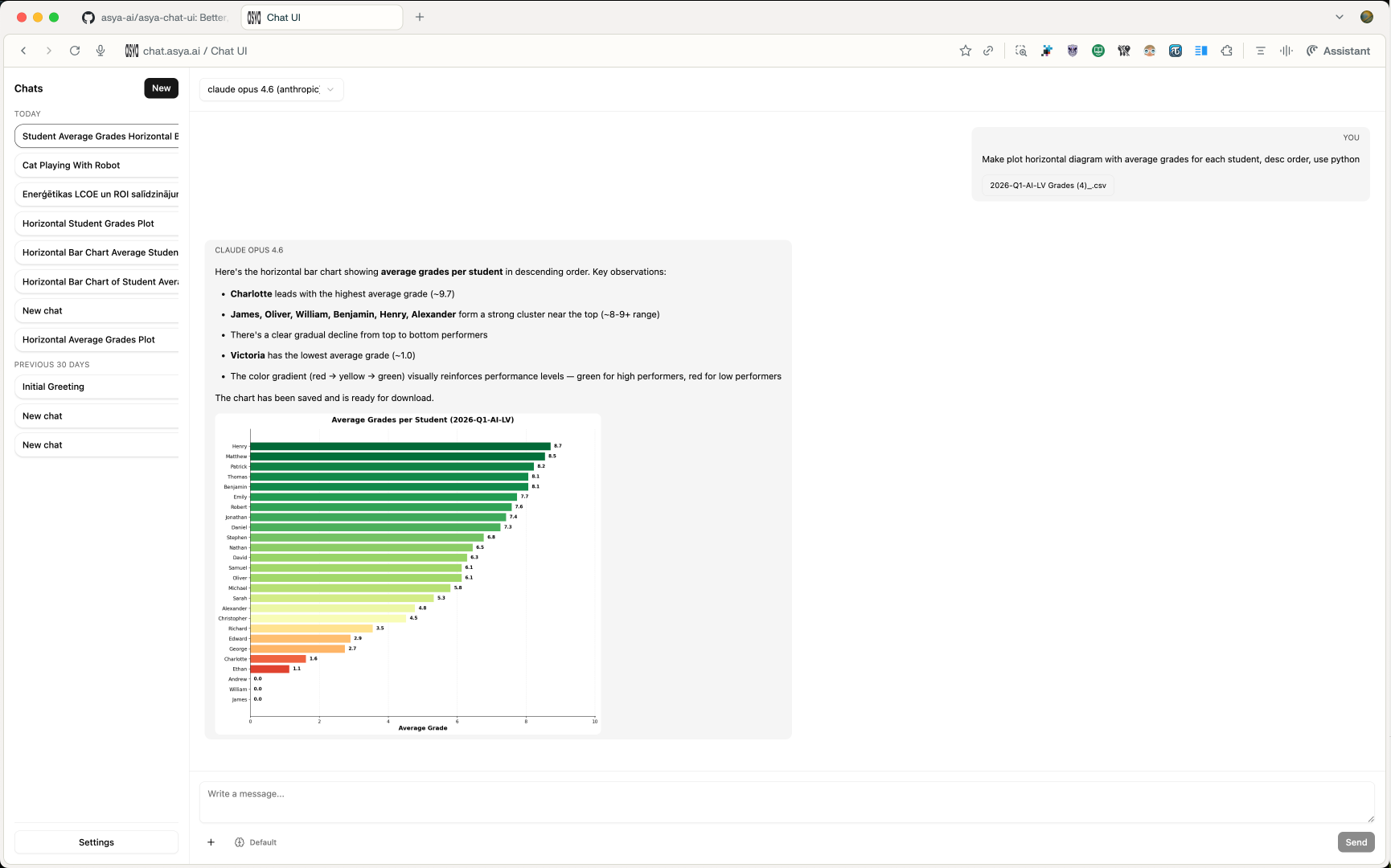


- UX improvements (larger visuals, left side panel CSS)
- UX button to enable/disable Web Search (DuckDuckGo & Perplexity API)
- Function to share public chat
- Group chats (groups that see each other chats)
- … Add your own feature requests in Github Issues
This project is released under GNU GPL v3.0. See LICENSE for the full text.
asya-chat-ui is a full-stack chat application that supports:
- multi-organization and role-based access (
super_admin, org admins, members) - model management per organization (enable/disable models and providers)
- multiple provider backends (OpenAI, Azure OpenAI, Gemini, Groq, Anthropic, OpenRouter, Vertex)
- streaming chat generation with resumable task events
- built-in tools for web search/scraping, code execution, time, and image generation/editing
- OpenAI-compatible API endpoints (
/v1/models,/v1/chat/completions,/v1/responses,/v1/embeddings) - usage tracking by model/user/org/month
The stack is split into services orchestrated with Docker Compose:
nginx: serves the frontend build and proxies/api/*to backendbackend: FastAPI app for auth, chat APIs, org/model config, usage, and OpenAI compatibilityworker: Celery worker for async chat generation taskspostgres: primary relational data storeredis: broker/result backend for Celery task orchestrationscraper: Puppeteer + Readability microservice used by web toolsdind: Docker-in-Docker engine used to run sandboxed code execution containersexecutor(profileexec): image build target for Python code execution runtime
- Frontend (React + Vite) sends requests to
/api/...(REST) and/api/chats/{chat_id}/ws(WebSocket). nginxrewrites/api/*and forwards to FastAPI.
- User message is saved in Postgres.
- Backend creates a generation task and assistant placeholder message.
- Worker executes provider calls and tool loops.
- Worker emits ordered generation events (
activity,tool_event,delta,done,error) into DB. - Frontend consumes real-time events over WebSocket; falls back to polling task events when needed.
- Web tools call scraper service for search/scrape or screenshots.
- Code execution tool writes inputs/outputs under
data/files, then runs code in an isolated container viadind. - Image tools can generate/edit image outputs and attach them to assistant messages.
- Every generation (and embedding/image operation) writes token and usage metadata into
UsageEvent. - Usage endpoints aggregate data by model/user/org/month.
frontend/- React app UI (chat, settings, auth, usage pages)backend/app/- FastAPI APIs, provider adapters, tools, worker logic, modelsbackend/alembic/- database migrationsscraper/- Node.js headless browser scraping servicenginx/- reverse proxy and static hosting configdocker-compose.yml- core service topologydocker-compose.override.yml- development overrides (hot reload + frontend dev server)
- Copy environment template:
cp .env.example .env- Set required values at minimum:
JWT_SECRET- database values (
DATABASE_URLorPOSTGRES_*) - at least one provider key (
OPENAI_API_KEY,GEMINI_API_KEY,ANTHROPIC_API_KEY, etc.)
- Optional but commonly used:
- SMTP values for invite/password reset emails
- org-level super admin bootstrap (
SUPER_ADMIN_EMAILS) - execution limits (
EXEC_*) and attachment limits
docker compose up --buildThis uses docker-compose.override.yml automatically, enabling:
- backend auto-reload
- frontend dev server on
http://localhost:5173
Main app URL through nginx: http://127.0.0.1:8085
docker compose -f docker-compose.yml up --buildIn this mode, nginx serves the production frontend build bundled in its image.
docker compose --profile exec build executor- Auth and account:
/auth/* - API keys:
/api-keys/* - Orgs and provider configuration:
/orgs/* - Models and model suggestions:
/models/* - Chats, messages, generation tasks/events, WebSocket stream:
/chats/* - Usage aggregation:
/usage/* - OpenAI-compatible endpoints:
/v1/* - Health check:
/healthz
- Scraper blocks private/loopback/internal IP destinations.
- Code execution runs in isolated containers with:
- dropped capabilities
- read-only root filesystem
- cpu/memory limits
- timeout and output-size caps
- import allowlist enforcement
- Auth uses JWT with periodic token refresh through response header.
- Provider access can be disabled globally per org and overridden per org config.
- Frontend package manager:
pnpm - Backend package manager/runtime tooling:
uv - Database migrations: Alembic (
uv run alembic upgrade head) - Backend health endpoint:
GET /healthz - Scraper health endpoint:
GET /healthzon scraper service
This project is developed and maintained by asya.ai, and published as open source at asya-ai/asya-chat-ui under GPLv3.