
Note Calendar is a simple offline app which allows to manage notes for different days and offers a quick way to reach each of them.
Minimum Android version: 5.0 (Lollipop, API level 21)


Compose migration phase is done. Now I'm redesigning day screen part of the app.
Next will be month and week screens to allow features like copy, cut, delete without going to day screen.
Once work on these parts is finished I'll update the strings.xml (translations) to ensure new features are properly translated.


- Day screen
- This screen is used to add, edit or delete note
- Week screen
- Month screen
- Days that constains a note are marked with a ring
- Day that is currently selected is marked with a solid circle
- Today's day is marked with a different color of text
- Long press on a day's number allow to quickly add or edit note for that day
- Settings screen
- Theming
- Setting custom theme which includes 10 modifiable colors
- Setting light theme
- Setting dark theme
- Setting default theme based on system settings
- Notes deletion
- Notifications
- When turned on, a notification will appear at notification time
- Setting first day of week
- Setting starting screen
- Theming
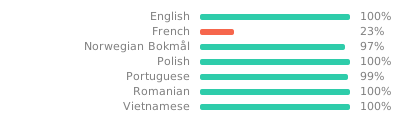
When English translation string is ? that means the translation is optional and will be
translated automatically. That way specific strings are translated for all languages without manual
translations.
You can however add translation for your language for that type of string if the automatic one is
not the best fit.
You can help with translations on https://hosted.weblate.org/projects/note-calendar/.
Accessible translation platform is available thanks to Weblate and their support for libre projects. Hosting such platform costs money, if you want to help the Weblate project, you can donate here.
NoteCalendar is licensed under the MIT license.