A real-time Kanban board for managing and tracking GitHub pull request reviews across multiple repositories. Streamline your code review workflow with an intuitive drag-and-drop interface and live updates via GitHub webhooks.
- Kanban Board Interface - Organize PRs into customizable columns: Open PRs, Ready for Review, Needs Changes, and Already Reviewed
- Real-time Updates - Instant synchronization via Socket.IO when PR status changes
- GitHub Webhook Integration - Automatic PR tracking when pull requests are opened, updated, or reviewed
- Multi-Repository Support - Monitor multiple repositories from a single dashboard
- Drag & Drop - Easily move PRs between review stages with intuitive drag-and-drop
- Repository Statistics - Quick overview of PR counts per status for each repository
- Author Information - Display author avatars, names, and branch information
- Label Support - View GitHub labels on each PR card
- Draft PR Detection - Visual indicator for draft PRs (cannot be moved between columns)
- Time Tracking - Relative timestamps showing when PRs were last updated
- Persistent Storage - SQLite database for reliable data persistence
- Modern UI - Beautiful dark theme with Tailwind CSS styling
The application features a clean, modern interface with:
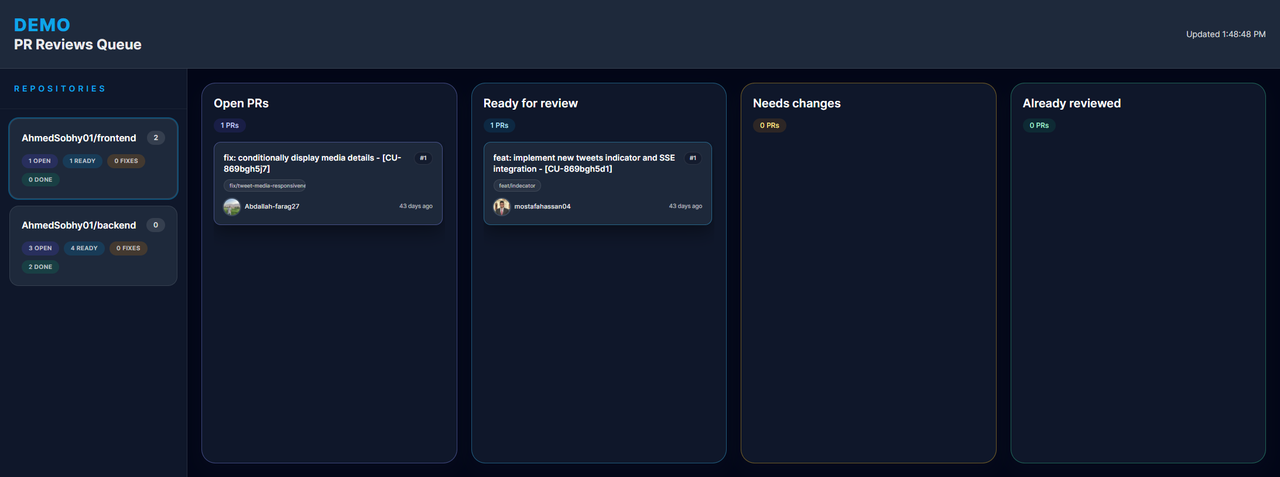
- A sidebar showing all configured repositories with PR statistics
- A main Kanban board with four columns for different review stages
- Individual PR cards displaying title, author, branch, labels, and timestamps
git clone https://github.com/AhmedSobhy01/pr-review-queue.git
cd pr-review-queue# Install backend dependencies
cd backend
npm install
# Install frontend dependencies
cd ../frontend
npm installEdit backend/repositories.config.json to add the repositories you want to track:
[
    {
        "id": "owner/repo-name",
        "name": "My Repository"
    },
    {
        "id": "organization/another-repo",
        "name": "Another Project"
    }
]Create a .env file in the backend directory:
# Server port (default: 4000)
PORT=4000

# Comma-separated list of allowed client origins
CLIENT_ORIGINS=http://localhost:5173

# GitHub webhook secret (required for webhook verification)
GITHUB_WEBHOOK_SECRET=your-webhook-secret

# Optional: Custom SQLite database location
# SQLITE_DATA_DIR=/path/to/data
# SQLITE_DB_PATH=/path/to/repo-store.db- Go to your GitHub repository → Settings → Webhooks → Add webhook
- Set the Payload URL to:
https://your-server.com/api/webhooks/github - Set Content type to:
application/json - Set the Secret to match your
GITHUB_WEBHOOK_SECRET - Select events: Pull requests and Pull request reviews
- Save the webhook
Development Mode:
cd backend
npm run dev

cd frontend
npm run dev
Production Mode:
cd backend
npm run build
npm start

cd frontend
npm run build
npm run preview
The frontend will be available at http://localhost:5173 and the backend API at http://localhost:4000.
PRs flow through the following statuses:
- Open PRs (Uncategorized) - New PRs from GitHub webhooks land here
- Ready for Review - PRs that are ready to be reviewed
- Needs Changes - PRs that require modifications based on review feedback
- Already Reviewed - PRs that have been reviewed and approved
Note: Draft PRs are visually marked and cannot be moved between columns until they are marked as ready for review on GitHub.
This project is licensed under the MIT License - see the LICENSE file for details.