NOTE: Code examples in this section are stored in
examples/2/. Commands assume you run them from that directory.
Table of Contents:
- Basics
- Get started with Go in the classic way: printing "Hello World" (Ken Thompson & Dennies Ritchie started this when they presented the C language in the 1970s #til)
/* hello_world.go */
package main

import "fmt" // Implements formatted I/O

/* Say Hello-World */
func main() {
    fmt.Printf("Hello World")
}- To build helloworld.go, just type:
go build helloworld.go # Return an executable called helloworld- Run a previous step result
./helloworld- Want to combine these two steps? Ok, Golang got you.
go run helloworld.go- Go is different from most other language in that type of a variable is specified after the variable name: a int.
/* When you declare a variable it is assigned the "natural" null value for the type */
var a int // a has a value of 0
var s string // s is assigned the zero string, which is ""
a = 26
s = "hello"

/* Declaring & assigning in Go is a two step process, but they may be combined */
a := 26 // In this case the variable type is deduced from the value. A value of 26 indicates an int for example.
b := "hello" // The type should be string

/* Multiple var declarations may also be grouped (import & const also allow this) */
var (
    a int
    b string
)

/* Multiple variables of the same type ca also be declared on a single line */
var a, b int
a, b := 26, 9

/* A special name for a variable is _, any value assigned to it is discarded. */
_, b := 26, 9bool
- Go has most of the well-know types such as
int- it has the appropriate length for your machine (32-bit machine - 32 bits, 64-bit machine - 64 bits) - The full list for (signed & unsigned) integers is
int8,int16,int32,int64&byte(an alias foruint8),uint8,uint16,uint32,uint64. - For floating point values there is
float32,float64,float.
/* numerical_types.go */
package main

func main() {
    var a int
    var b int32
    b = a + a // Give an error: cannot use a + a (type int) as type int32 in assignment.
    b = b + 5
}Constants are created at compile time, & can only be numbers, strings, or booleans. You can use iota to enumerate values.
const (
    a = iota // First use of iota will yield 0. Whenever iota is used again on a new line its value is incremented with 1, so b has a vaue of 1.
    b
)- Strings in Go are a sequence of UTF-8 characters enclosed in double quotes. If you use the single quote you mean one character (encoded in UTF-8) - which is not a
stringin Go. Note that! In Python (my favourite programming language), I can use both of them for string assignment. - String in Go are immutable. To change one character in string, you have to create a new one.
s1 := "Hello"
c := []rune(s) // Convert s1 to an array of runes
c[0] := 'M'
s2 := string(c) // Create a new string s2 with the alteration
fmt.Printf("%s\n", s2)Rune is an alias for int32, (use when you're iterating over characters in a string).
complex128 (64 bit real & imaginary parts) or complex32.
Go has a builtin type specially for errors, called error.var e.
Go 1.18 brings support for Generic types. The generics implementation provided by Go 1.18 follows the type parameter proposal and allows developers to add optional type parameters to type and function declarations.
NOTE (Go 1.24): Go 1.24 introduces Generic Type Aliases, allowing type aliases to have type parameters:
type Set[T comparable] = map[T]struct{}
package main

import "fmt"

type Number interface {
    int64 | float64
}

func main() {
    // Initialize a map for the integer values
    ints := map[string]int64{
        "first": 34,
        "second": 12,
    }

    // Initialize a map for the float values
    floats := map[string]float64{
        "first": 35.98,
        "second": 26.99,
    }

    fmt.Printf("Non-Generic Sums: %v and %v\n",
        SumInts(ints),
        SumFloats(floats))

    fmt.Printf("Generic Sums: %v and %v\n",
        SumIntsOrFloats[string, int64](ints),
        SumIntsOrFloats[string, float64](floats))

    fmt.Printf("Generic Sums, type parameters inferred: %v and %v\n",
        SumIntsOrFloats(ints),
        SumIntsOrFloats(floats))

    fmt.Printf("Generic Sums with Constraint: %v and %v\n",
        SumNumbers(ints),
        SumNumbers(floats))
}

// SumInts adds together the values of m.
func SumInts(m map[string]int64) int64 {
    var s int64
    for _, v := range m {
        s += v
    }
    return s
}

// SumFloats adds together the values of m.
func SumFloats(m map[string]float64) float64 {
    var s float64
    for _, v := range m {
        s += v
    }
    return s
}

// SumIntsOrFloats sums the values of map m. It supports both floats and integers
// as map values.
func SumIntsOrFloats[K comparable, V int64 | float64](m map[K]V) V {
    var s V
    for _, v := range m {
        s += v
    }
    return s
}

// SumNumbers sums the values of map m. Its supports both integers
// and floats as map values.
func SumNumbers[K comparable, V Number](m map[K]V) V {
    var s V
    for _, v := range m {
        s += v
    }
    return s
}- Go supports the normal set of numerical operators.
Precedence    Operator(s)
Highest       * / % << >> & &^
            `+ -
            == != < <= > >=
            <-
            &&
Lowest        ||
&bitwise and,|bitwise or,^bitwise xor,&^bit clear respectively.
break     default      func    interface   select
case      defer        go      map         struct
chan      else         goto    package     switch
const     fallthrough  if      range       type
continue  for          import  return      var
var,const,package,importare used in the previous sections.funcis used to declare functions & methods.returnis used to return from functions.gois used for concurrency.selectis used to choose from different types of communication.interface.structis used for abstract data types.type.
if x > 0 {
    return y
} else {
    return x
}

if err := MagicFunction(); err != nil {
    return err
}

// do somethingWith goto you jump to a label which must be defined within the current function.
/* goto_test */
/* Create a loop */
func gototestfunc() {
    i := 0
Here:
    fmt.Println()
    i++
    goto Here
}for loop has three forms, only one of which has semicolons:
for init; condition; post { } // aloop using the syntax borrowed from C
for condition { } // a while loop
for { } // a endless loop

sum := 0
for i := 0; i < 10; i++ {
    sum = sum + i
}for i := 0; i < 10; i++ {
if i > 5 {
break
}
fmt.Println(i)
}
/* With loops within loop you can specify a label after `break` to identify which loop to stop */
J: for j := 0; j < 5; j++ {
for i := 0; i < 10; i++ {
if i > 5 {
break J
}
fmt.Println(i)
}
}rangecan be used for loops. It can loop over slices, arrays, strings, maps & channels.rangeis an iterator that, when called, returns the next key-value pair from the "thing" it loops over.
list := []string{"a", "b", "c", "d", "e", "f"}
for k, v := range list {
    // do some fancy thing with k & v
}- The case are evaluated top to bottom until a match is found, & if the
switchhas no expression it switches ontrue. - It's therefore possible - & idomatic - to write an
if-else-if-elsechain as aswitch.
/* Convert hexadecimal character to an int value */
switch { // switch without condition = switch true
    case '0' <= c && c <= '9':
        return c - '0'
    case 'a' <= c && c <= 'f':
        return c - 'a' + 10
    case 'A' <= c && c <= 'F':
        return c - 'A' + 10
}
return 0

/* Automatic fall through */
switch i {
    case 0: fallthrough
    case 1:
        f()
    default:
        g()
}close new panic complex
delete make recover real
len append print imag
cap copy println
- close: is used in channel communication. It closes a channel (obviously XD)
- delete: is used for deleting entries in maps.
- len & cap: are used on a number of different types,
lenis used to return the lengths of strrings, maps, slices & arrays. - new: is used for allocating memory for user defined data types.
- copy, append:
copyis for copying slices. Andappendis for concatenating slices. - panic, recover: are used for an exception mechanism.
- complex, real, imag: all deal with complex numbers.
- Brief: list -> arrays, slices. dict -> map
- An array is defined by
[n]<type>.
var arr [10]int // The size is part of the type, fixed size
arr[0] = 42
arr[1] = 13
fmt.Printf("The first element is %s\n", arr[0])

// Initialize an array to something other than zero, using composite literal
a := [3]int{1, 2, 3}
a := [...]int{1, 2, 3}- Array are value types: Assigning one array to another copies all the elements. In particular, if you pass an array to a function it will receive a copy of the array, not a pointer to it. To avoid the copy you could pass a pointer to the array, but then that's a pointer to an array, not an array.
- Similar to an array, but it can grow when new elements are added.
- A slice is a pointer to an (underlaying) array, slices are reference types.
// Init array primes
primes := [6]int{2, 3, 5, 7, 11, 13}

// Init slice s
var s []int = primes[1:4]

fmt.Println(s) // Return [3, 5, 7]

/* slice_length_capacity.go */
package main

import "fmt"

func main() {
    s := []int{2, 3, 5, 7, 11, 13}
    printSlice(s)

    // Slice the slice to give it zero length.
    s = s[:0]
    printSlice(s)

    // Extend its length.
    s = s[:4]
    printSlice(s)

    // Drop its first two values.
    s = s[2:]
    printSlice(s)
}

func printSlice(s []int) {
    fmt.Printf("len=%d cap=%d %v\n", len(s), cap(s), s)
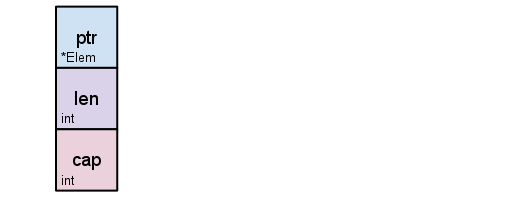
}- A slice is a descriptor of an array segment. It consists of a pointer to the array, the length of the segment & its capacity (the maximum length of the segment).
s := make([]byte, 5)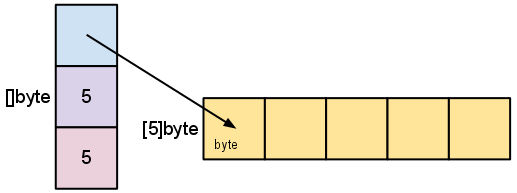
-
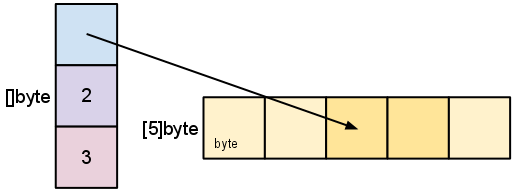
lenis the number of elements referred to by the slice. -
capis the number of elements in the underlying array (beginning at the element referred to by the slice pointer).s = s[2:4]
-
Slicing does not copy the slice's data. It creates a new slice that points to the original array. This makes slice operations as efficient as manipulating array indicies. Therefore, modifying the elements (not the slice itself) of a re-slice modifies the elements of the original slice:
d := []byte{'r', 'o', 'a', 'd'}
e := d[2:]
// e = []byte{'a', 'd'}
e[1] = 'm'
// e = []byte{'a', 'm'}
// d = []byte{'r', 'o', 'a', 'm'}
- Earlier we sliced
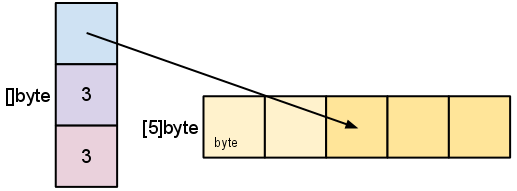
sto a length shorter than its capacity. We can grow s to its capacity by slicing it again.
s = s[:cap(s)]
- Earlier we sliced
-
-
A slice cannot be grown beyond its capacity.
// Another example
var array [m]int
slice := array[:n]
// len(slice) == n
// cap(slice) == m
// len(array) == cap(array) == m- To extend a slice, there are a couple of built-in functions that make life easier:
append©.
s0 := []int{0, 0}
s1 := append(s0, 2) // same type as s0 - int.
// If the original slice isn't big enough to fit the added values,
// append will allocate a new slice that is big enough. So the slice
// returned by append may refer to a different underlaying array than
// the original slices does.
s2 := append(s1, 3, 5, 7)
s3 := append(s2, s0...) // []int{0, 0, 2, 3, 5, 7, 0, 0} - three dots used after s0 is needed make it clear explicit that you're appending another slice, instead of a single value

var a = [...]int{0, 1, 2, 3, 4, 5, 6, 7}
var s = make([]int, 6)
// copy function copies slice elements from source to a destination
// returns the number of elements it copied
n1 := copy(s, a[0:]) // n1 = 6; s := []int{0, 1, 2, 3, 4, 5}
n2 := copy(s, s[2:]) // n2 = 4; s := []int{2, 3, 4, 5, 4, 5}- Python has its dictionaries. In go we have the
maptype.
monthdays := map[string]int{
    "Jan": 31, "Feb": 28, "Mar": 31,
    "Apr": 30, "May": 31, "Jun": 30,
    "Jul": 31, "Aug": 31, "Sep": 30,
    "Oct": 31, "Nov": 30, "Dec": 31, // A trailing comma is required
}

value, key := monthdays["Jan"]- Use
makewhen only declaring a map. A map is reference type. A map is not reference variable, its value is a pointer to aruntime.hmapstructure.
- There are no classes, only structs. Structs can have methods:
// A struct is a type. It's also a collection of fields

// Declaration
type Vertex struct {
    X, Y float64
}

// Creating
var v = Vertex{1, 2}
var v = Vertex{X: 1, Y: 2} // Creates a struct by defining values with keys
var v = []Vertex{{1,2},{5,2},{5,5}} // Initialize a slice of structs

// Accessing members
v.X = 4

// You can declare methods on structs. The struct you want to declare the
// method on (the receiving type) comes between the the func keyword and
// the method name. The struct is copied on each method call(!)
func (v Vertex) Abs() float64 {
    return math.Sqrt(v.X*v.X + v.Y*v.Y)
}

// Call method
v.Abs()

// For mutating methods, you need to use a pointer (see below) to the Struct
// as the type. With this, the struct value is not copied for the method call.
func (v *Vertex) add(n float64) {
    v.X += n
    v.Y += n
}- Anonymous structs: cheaper & safer than using
map[string]intefaces. - You can check Defining your own types for more.
- There is no subclassing in Go. Instead, there is interface and struct embedding.
// ReadWriter implementations must satisfy both Reader and Writer
type ReadWriter interface {
    Reader
    Writer
}

// Server exposes all the methods that Logger has
type Server struct {
    Host string
    Port int
    *log.Logger
}

// initialize the embedded type the usual way
server := &Server{"localhost", 80, log.New(...)}

// methods implemented on the embedded struct are passed through
server.Log(...) // calls server.Logger.Log(...)

// the field name of the embedded type is its type name (in this case Logger)
var logger *log.Logger = server.Logger