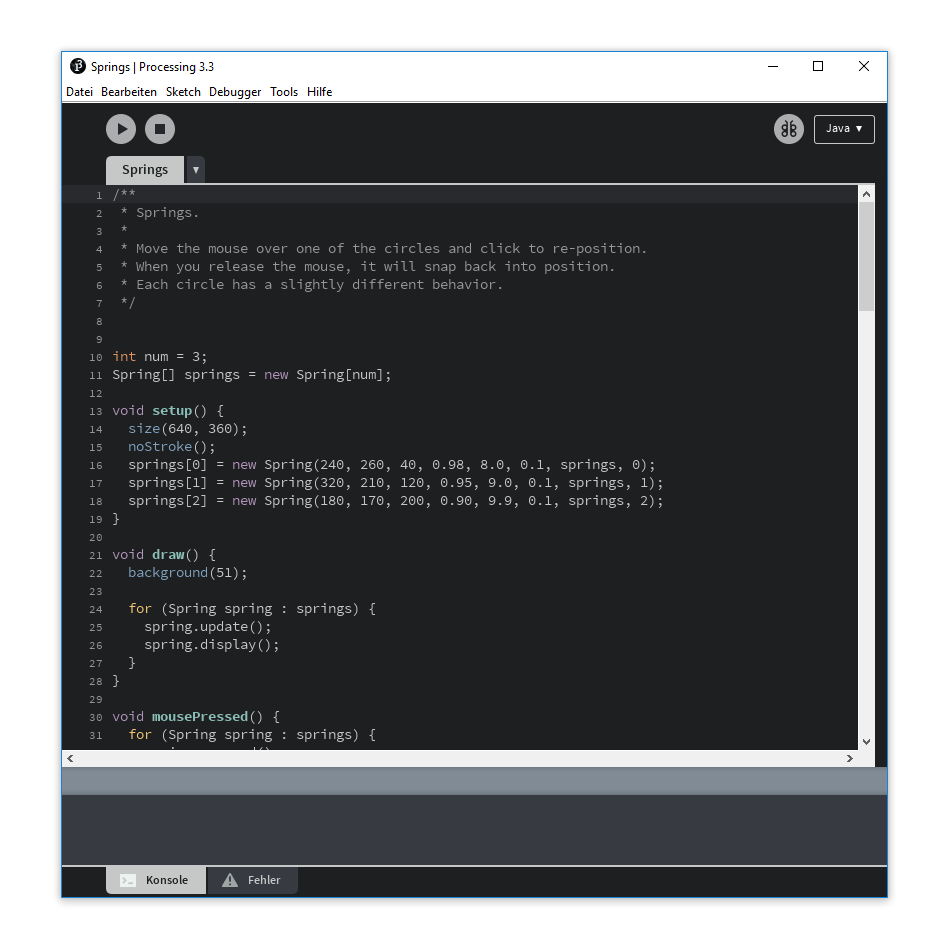
Processing 3 IDE ships with a light and blueish color theme. That's boring, isn't it? Simply replace the files theme.txt and preferences.txt and you'll be delighted by a more professional lookig IDE. The theme is based upon the Tomorrow Night Theme by Chris Kempson.
Tested in Processing 3.5.3
preferences.txt
Replace the preferences.txt located in %UserProfile%\AppData\Roaming\Processing\.
theme.txt
Replace the theme.txt located in %HomeDrive%\processing64\processing-3.3.6\lib\ or however your installation path might be.
preferences.txt
Replace the preferences.txt located in ~/Library/Processing/preferences.txt.
theme.txt
Replace the theme.txt located in ~/Applications/Processing.app/Contents/Java/lib.
I also recommend using the Hack font. It's nicer than the default, Source Code Pro, in my opinion.