Thanks again for the preset and all the help to the community!
What is the issue?
Upon rebuilding, webpack will recursively nest the assets folder with each rebuild. This causes livereload to break for images and newer JS files.
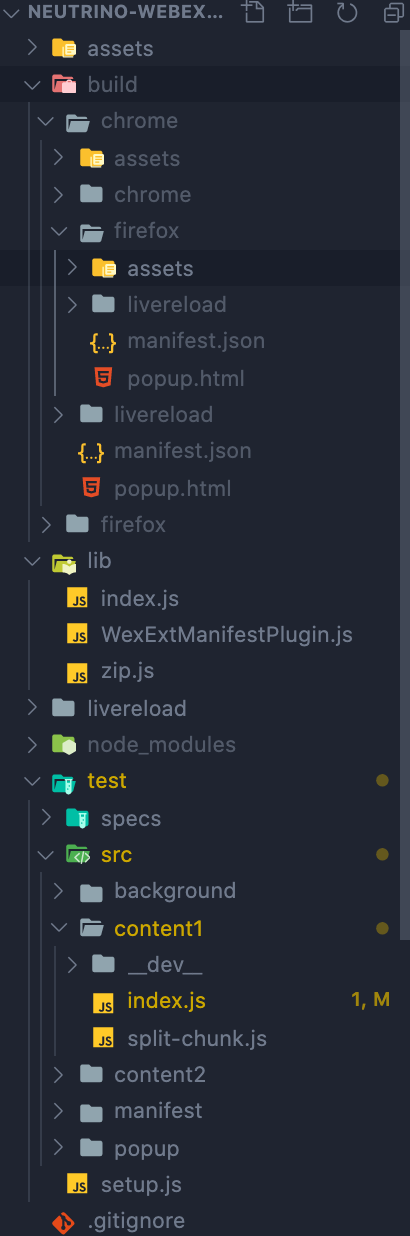
Expected behavior
Everything should be rebuilt and remain within the top-level build/ directory so live reloading works properly and doesn't point at the wrong asset files. In the case of copying over images or other static assets, after the first rebuild, the browser will throw an error stating it is unable to find the specified assets in the manifest.
Steps to reproduce
- Check out this repo
yarn installyarn build --debug --livereload --watch- Edit any source file watched for a meaningful change
- Check build/ directory to see the nested folder structure
Will be digging more into the cause. Thanks for any help :)

Thanks again for the preset and all the help to the community!
What is the issue?
Upon rebuilding, webpack will recursively nest the assets folder with each rebuild. This causes livereload to break for images and newer JS files.
Expected behavior
Everything should be rebuilt and remain within the top-level build/ directory so live reloading works properly and doesn't point at the wrong asset files. In the case of copying over images or other static assets, after the first rebuild, the browser will throw an error stating it is unable to find the specified assets in the manifest.
Steps to reproduce
yarn installyarn build --debug --livereload --watchWill be digging more into the cause. Thanks for any help :)