🚨 This compendium is a work in progress ➡️ also see the repo's associated Updates doc. 🚨


- Objectives
- Schematics
- Resources: Machine learning (classical)
- Resources: Deep learning
- Resources: Uncertainty assessment / accuracy assessment
- Resources: Other
- Software installers
- Document the various Machine Learning approaches available across various [desktop + cloud] platforms (e.g. ArcGIS Pro, ENVI, ERDAS Imagine, GEE, QGIS, R, SNAP, TerrSet)
- Compile resources (including tutorials and sample scripts) regarding how to implement those approaches in the platforms listed ⬆️
- Understand how to replicate ML workflows from one platform to another
- Understand the limitations of the various ML approaches 🤔
- Push the limits of the various approaches
- For instance, what determines the taste of the cake? The quality of the ingredients used, or the technique of the baker? 🤔
- Overview of the distinctions between Artificial Intelligence (AI), Machine Learning (ML), and Deep Learning (DL)

source: Human Centered AI Lab (2017)
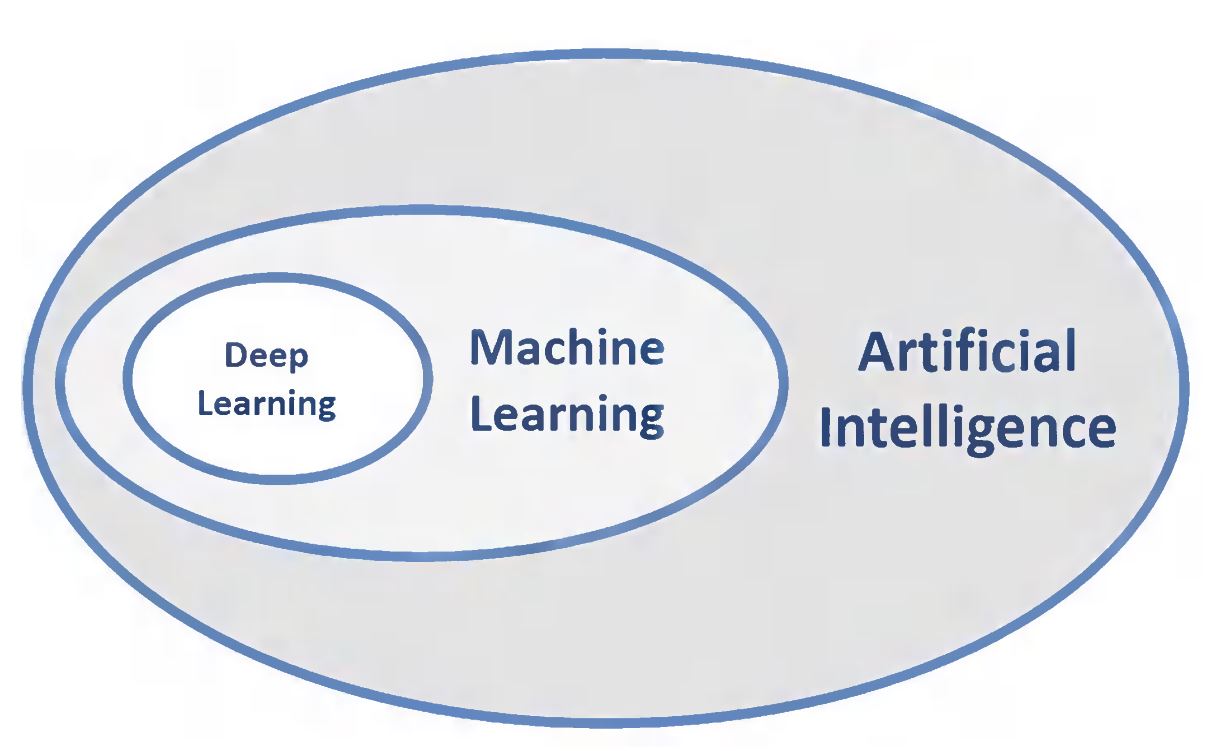
Therefore ⬇️ we will focus on the broader ML and the DL aspects of geospatial artificial intelligence. 🧐
- Overview of various tools for doing ML (“SciKit-Learn algorithm cheat sheet”):

source: SciKitLearn
These are resources for commonly-used software applications.
Let's start with an overview of Machine Learning.
 source: Google (2022)
By the way, how does classical / traditional ML differ from Deep Learning? 🤔
 source: Google (2024)
K-means

source: B. Howell (2006)
ISODATA

source: B. Howell (2006)

source: J. Jensen (2005)

source: J. Jensen (2005)
Minimum Distance

source: B. Howell (2006)
Maximum Likelihood

source: B. Howell (2006)
Support Vector Machine

source: SciKit-Learn (2024)
Random Forest

source: RUS-Copernicus (2017)
Other: Miscellaneous supervised ML classification output options in Earth Engine ➡️ some classifiers output class probability maps

source: Google (2022) | for viewing class probabilities, see this
ArcGIS
- Classifying Images in ArcGIS Desktop 10.4 tutorial
- Train a 'Random Trees' classifier in ArcGIS Desktop tutorial
- Random Forest explainer video 🎥
- Overview of image classification in ArcGIS Pro tutorial
QGIS
- Supervised classification using the Semi-automatic classification Plugin (SCP)’s various algorithms and Sentinel-2 data in QGIS tutorial
ENVI
SNAP
- Unsupervised classification of land cover using Sentinel-1 in SNAP tutorial
- Supervised classification (Random Forests) of forests using Sentinel-2 in SNAP tutorial
- Land cover classification (unsupervised, supervised) using Sentinel-1 in SNAP tutorial
Google Earth Engine (GEE)
- Basic ML in GEE
- Overview of unsupervised ML
- Overview of supervised ML
- Example excercise for supervised classification using GEE
- Example supervised learning classifiers
- Minimum distance ➡️ includes 4 approaches, including:
- Euclidean Distance
- Mahalanobis Distance
- Manhattan Distance
- Spectral Angle / Cosine
- Example Minimum Distance script (including a condition limiting the minimum distance to classes)
- Support Vector Machine (SVM)
- Classification & Regression Trees (CART)
- Naives Bayes ➡️ includes what is otherwise referred to as Maximum Likelihood Classification (MLC)
- Random Forest
- Minimum distance ➡️ includes 4 approaches, including:


"Everybody else is doing [Deep Learning], so why can't we?"

source: modified from the Cranberries' "Everybody Else is Doing It, So Why Can't We?" album cover (1993)
TensorFlow resources

source: Google
Resources from Development Seed
- Development Seed (2021): Deep Learning overview resources developed for SERVIR Amazonia: GitHub repo
- Development Seed (2021): Deep Learning overview resources developed for SERVIR Amazonia: Jupyter Book
Resources from SERVIR
- SERVIR (2019): TensorFlow basics overview by Kel Markert
- SERVIR GeoAI Working Group (alternatively the Geo-AI Working Group or Geo AI Working Group, and formerly the TensorFlow Working Group) resources (2019-present)
- SERVIR GeoAI Working Group presentation videos (~2022-present) 🎥
- Overview of how GEE connects to Google Cloud and AI (Sept. 2019): "Understanding the workflow between the Tensorflow library, Google Cloud Platform, Google Earth Engine, and Google Colab is a challenging undertaking..." (T. Mayer / SERVIR SCO)

Resources from Spatial Thoughts
- Building a Deep Neural Network
- Slides / Video 🎥
- Colab Notebook → this can be run using local (i.e. desktop or laptop) resources, per these instructions

source: U. Gandhi / Spatial Thoughts (2024)
Resources from Google
- Google (2019): Overview of the connections between GEE, Google Cloud, and the AI Platform (now formally, "Vertex AI"):

source: N. Clinton, C. Brown / Google (2019)
- Google (2022): Overview of implementing DL using GEE and TensorFlow

source: Google (2022)
-
Google (2023):
-
Google (2024): Deep Learning with Earth Engine & Vertex AI
- Slides
- Colab Notebook: Soybean mapping
- Other Vertex AI examples
-
Google (2025)
- Embeddings (Embedding Fields Model) ➡️ also see this
- GEE Data Catalog entry
- Blog post
- White paper
- Slides (w/ code links) - from the ESA Living Planet Symposium
- Slides (w/ code links) - from Geo For Good 2025 NYC
- Tutorials
- Machine Learning with Earth Engine & Vertex AI slides
- Embeddings (Embedding Fields Model) ➡️ also see this
Resources from other sources
- Deep learning for land cover classification example (2023) - from @Ramiqcom

source: Esri (2021)
- "Demystifying Geo AI" article 2023
- "Land Cover Mapping using Pretrained Deep Learning Models" article 2023
- "GeoAI: Artificial Intelligence in GIS" book 2025
- "Resources for Unlocking the Power of Geospatial AI Using ArcGIS" article 2023
- Deep learning in ArcGIS Pro 3.x
- Overview: "Deep Learning for Image Analyst – What’s New in ArcGIS Pro 3.2" (2023)
- Overview: "What's new for GeoAI in the Image Analyst extension of ArcGIS Pro 3.3" (2024)
- Classifying pixels using DL with ArcGIS' Image Analyst
- Classifying objects using DL with ArcGIS' Image Analyst
- Pixel classification ➡️ "In this case of sparse training samples as below, you must set the ignore class parameter to 0. This will ignore the pixels that have not been classified for training."
- Selecting DL model type ➡️ "Classify pixels using deep learning" → "Classified tiles" option
- Deep learning toolset ➡️ explanation of the main ArcGIS DL tools
- Deep learning model architectures ➡️ really useful to review 😉
- Training Deep Learning Model (Image Analyst)
- Deep learning model review
- Pretrained Deep Learning Models
- "Introducing pretrained geospatial deep learning models" article (2020)
- Pixel classification models
- Prithvi-related models (via IBM / NASA)
- Segment Anything Model (SAM) instructions
- Deep Learning package for ArcGIS
- Installation notes
- Installers
- Introduction to deep learning (2025)
- [Non-Esri] Quick Intro to Deep Learning Classifications in ArcGIS Pro (2023)
- Deep learning via ArcGIS API for Python page (2022)
- Esri Jupyter notebooks setup instructions (from Purdue U.)
- Example classification tutorial video 🎥 (from GeoTown)
- Esri community forum
- Esri Australia GIS Directions podcast episodes on Machine Learning

source: screenshot from ArcGIS Pro v. 3.3
- General list of QGIS plugins referencing DL
- QGIS Deepness: Deep Neural Remote Sensing plugin (2024) 🆕
- QGIS Deep Learning Tools plugin (2021)
- QGIS Deep Learning Datasets Maker plugin (2022)
- Overview of the ENVI Deep Learning Process page
- ENVI Deep Learning Guide Map
- What's New in ENVI Deep Learning 3.0 page
- ENVI Deep Learning system requirements page
- Train Deep Learning Models Using the ENVI Modeler page
- NeuralNet package basic documentation
- Torch (PyTorch) package basic documentation
- ReddIt thread re: packaging of PyTorch / TensorFlow in R → “Has anyone else noticed that there do not seem to be many packages in R that allow for Neural Networks and Deep Learning (with the exception of "nnet")? It seems that any time and R user would like to fit Neural Networks, they are "forced" to use the R version of "keras" (through "reticulate") - ultimately, the fitting of the Neural Network is done behind the scenes in Python.”
- DataCamp tutorial for building a neural network in R using NeuralNet, Keras, and TensorFlow packages
- Udemy course preview video 🎥 about neural networks in R (2019) → Udemy course

-
General accuracy assessment
-
Accuracy assessment of land cover data applying statistical best practices
- Area Estimation & Accuracy Assessment (AREA2) toolbox

source: Sara A. Metwalli / Towards Data Science (2020)
- The issue of training, validation, and test data
- Training, validation, and test data sets (Wikipedia): https://en.wikipedia.org/wiki/Training,_validation,_and_test_data_sets
- Definitions (from J. Brownlee, 2020): https://machinelearningmastery.com/difference-test-validation-datasets/
 source: J. Brownlee (2020)
GEE
- Earth Engine Fundamentals & Applications book (2022) 📔
- Videos 🎥
- EEFA book GEE code repository 💾
- Earth Engine higher education tutorials 📝
- Earth Engine general tutorials 📝
- Earth Engine Developers Google Group 👨💻
Miscellaneous
-
NASA Science Mission Directorate Artificial Intelligence initiative
-
U.S. General Services Administration (GSA) Artificial intelligence community of practice
-
Oak Ridge National Lab Trillion Pixel Challenge
- Sept. 2019 workshop report
- July 2023 workshop press release
- Sept. 2024 workshop report
-
Statistical Machine Intelligence and Learning Engine (SMILE)
- Google: SMILE Naive Bayes documentation
-
Other 'open source GIS tutorials' from Carleton University (Canada)
-
How to open a Google Colab Notebook from Github in Google Colab: "Just change the domain from 'github.com' to 'githubtocolab.com' and the notebook will open in Colab." source
Neural networks + deep learning in general
- ArcGIS Pro 3.x deep learning package installers ➡️ current to ArcGIS Pro 3.5 👀
- QGIS
- R
- Main program
- R Studio v.2025.05.1+513 installer
- SNAP installers
- TerrSet installers
If this documentation is used in publications, presentations, or other venues, please cite 📝 the following:
Cherrington, E. (2025). Geo AI Compendium (Version 1.0.0) [Document]. https://doi.org/10.5281/zenodo.16735094
If you have any questions, feel free to contact Emil Cherrington by 📩 email: emil.cherrington [at] uah.edu.